Icon of program: Screenium

Screenium for Mac

  • Trial version
  • 2.7
    175
  • 132.5K
  • V3.3.6

Capture everything on your screen

Screenium is an application which records activity on your Mac's screen.

Top Recommended Alternative

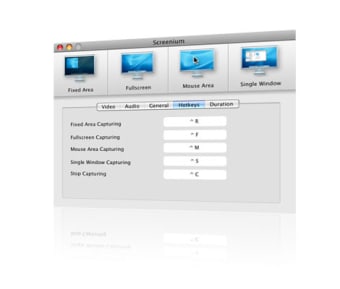
Perfect for preparing screencasts or tutorials, Screenium is accessible to any user. You can choose from four different capture selections: fixed area, full screen, mouse area, and single window. The application can also follow your mouse movements around and you can record using a time delay. Screenium includes different presets for image quality and file size, depending on what sort of video you're looking. We were a bit disappointed by the default video quality so we definitely recommend checking them out to find the one suited to your needs.

Screenium handles multi-channel audio recording so you can add multiple sounds, music and voice recordings to your video. Users will also find some handy keyboard shortcuts for the basic recording operations. A cool little feature is being able to add "hottext", a little bubble of text that appears in your video.

On the downside, when recording with a selected area, we were disappointed by the lack of borders and indications to remind you what you're recording. Similarly, the sliders to adjust the area felt a bit unintuitive.

Screenium offers a streamlined interface which makes recording your screen easy and quick. We'd recommend it to beginners who want a simple tool to make video recordings quickly. More practical than Mac's Grab tool and simpler than advanced recording applications like Snapz, Screenium is a good alternative to start with. Unfortunately, the current Beta version is too buggy and not stable enough. We hope future release will allow us to record screen activity without any trouble.

Despite being a little buggy, Screenium is a friendly application to record any area of your screen.

Changes

Compatible with Mac OS X 10.7 Lion Greatly improved tool to select the record area Improved handling of external audio interfaces with more than two channels


  • Pros

    • Streamlined
    • Four capture selections
    • Multi-channel audio recording
    • Presets for quality and file size
    • Add hottext to movie
  • Cons

    • Some bugs and errors
    • Doesn't show recording area live
 0/1

App specs

  • License

    Trial version

  • Version

    3.3.6
  • Latest update

  • Platform

    Mac

  • OS

    Mac OS X

  • Language

    English

    Available languages

    • Czech
    • English
    • Russian
  • Downloads

    132.5K

  • Size

    72.62 MB

  • Developer

Program available in other languages


Icon of program: Screenium

Screenium for Mac

  • Trial version
  • 2.7
    175
  • 132.5K
  • V3.3.6

User reviews about Screenium

2.7

1 reviews

Add review

Main reviews for you

  • Anonymous user

    This is actually good!. I used screenium to record videos on habbo hotel with my friends, Easy working and the uploading of the videos to youtube was easy! it's really great :)

More

You may also like

Alternatives to Screenium

Explore Apps

Latest articles

Laws concerning the use of this software vary from country to country. We do not encourage or condone the use of this program if it is in violation of these laws. Softonic does not encourage or condone the illegal streaming, duplication or distribution of copyrighted content. You are solely responsible for any use of the service.
Softonic

Is Screenium safe?

100/100

Score result: Clean

This file passed a comprehensive security scan using VirusTotal technology. It is safe to download.

  • Virus free
  • Spyware free
  • Malware free
  • Verified by Security Partners

    VirusTotal logo

Scan Info

Last scan
Sunday, March 30, 2025
Scan provider
VirusTotal · Full report

File Integrity

File
Screenium_V3.3.6.dmg
SHA256
fde718d2832dd87751d8a31fa54f0fd2e7584958e66048344ff048348030c09e
SHA1
33d6a34058b8c5c2df9edff7f11f8c655b76b9d3

Softonic security commitment

Screenium has been thoroughly scanned by our advanced security systems and verified by industry-leading partners. This file comes from the official developer and has passed all our security checks, showing no signs of viruses, malware, or spyware. For more information, visit our Security and Trust Center